
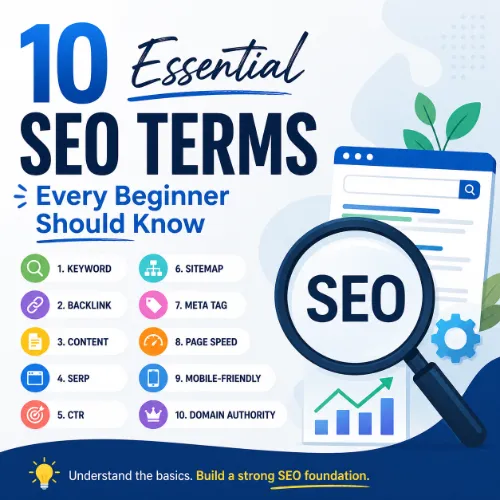
SEO terms every beginner should know Key Takeaways
Understanding the language of search engine optimization is the first step toward building a successful online presence.
- Learn the SEO terms every beginner should know like keywords, backlinks, and SERP features in plain language.
- Each term includes a simple definition and a practical takeaway you can apply immediately.
- Mastering basic SEO terminology helps you communicate with teams, evaluate tools, and grow organic traffic.
Why Understanding SEO Terms Every Beginner Should Know Matters
If you are new to digital marketing, the acronyms and jargon can feel overwhelming. Terms like crawl budget, keyword difficulty, and domain authority sound technical, but they describe simple concepts. Once you learn the essential vocabulary, you can follow tutorials, use SEO tools, and make smarter decisions about your website content. For a related guide, see 14 Trusted SEO Authority Signals That Prove Your Site Matters.
This article focuses on the 10 core SEO terms for beginners that appear in almost every strategy discussion. Each entry gives you a definition, an example, and a takeaway you can use today.
1. Keyword
A keyword is a word or phrase people type into search engines. For example, “vegan chocolate cake recipe” is a keyword. Your job is to create content that matches what searchers want.
Example: A gardening blog targeting “best soil for tomatoes” should write an article specifically about soil types, not a general gardening tip.
Takeaway: Use tools like Google Keyword Planner or Ahrefs Keywords Explorer to find keywords with good search volume and low competition.
2. SERP (Search Engine Results Page)
The SERP is the page you see after you hit search. It includes organic results, paid ads, featured snippets, and other elements. Understanding SERP features helps you optimize content for the format Google rewards.
Example: A recipe page might appear in a “People Also Ask” box or as a featured snippet with a photo and star rating.
Takeaway: Search for your target keyword and study what formats already rank. If Google shows a video, consider creating one.
3. Backlink
A backlink is a link from another website to yours. Search engines treat backlinks as votes of confidence. More high-quality backlinks usually mean higher rankings. For a related guide, see 15 Proven Link Building Strategies Still Working in 2026.
Example: A reputable news site links to your small business article about sustainable packaging. That link signals authority to Google.
Takeaway: Focus on earning links from relevant, trusted sites rather than buying low-quality links.
4. Organic Traffic
Organic traffic refers to visitors who find your site through unpaid search results. It is the most valuable traffic because it is free and targeted.
Example: A blog post that ranks #1 for “best running shoes for flat feet” attracts hundreds of visitors every day without any ad spend.
Takeaway: Track organic traffic in Google Search Console or Ahrefs to see which pages perform best.
5. On-Page SEO
On-page SEO includes changes you make directly on your website to improve rankings: title tags, headings, content quality, internal links, and image alt text.
Example: Adding the focus keyword “organic dog food” to your H1, first paragraph, and one image alt tag is basic on-page optimization.
Takeaway: Every page should target one main topic and use relevant keywords naturally throughout.
6. Off-Page SEO
Off-page SEO refers to actions taken outside your website that affect rankings, mainly link building and brand mentions. Social media activity also plays a supporting role.
Example: Guest posting on an industry blog and including a link back to your site is a classic off-page tactic.
Takeaway: Build relationships with other site owners and create shareable content to earn links organically.
7. Meta Description
A meta description is a short summary of a page that appears below the title in search results. It does not directly affect rankings but influences click-through rates.
Example: Instead of a generic description, write “Learn the 10 essential SEO terms every beginner should know with clear examples and practical tips.”
Takeaway: Write compelling meta descriptions between 150–160 characters that include your focus keyword and a call to action.
8. Indexing
Indexing is the process of Google storing your web pages in its database. If a page is not indexed, it cannot appear in search results.
Example: You publish a new blog post, but Google hasn’t crawled it yet. You can request indexing via Google Search Console.
Takeaway: Check your site’s index status regularly and fix pages that are blocked by robots.txt or noindex tags.
9. Crawling
Crawling is when Google’s bots (spiders) scan your website to discover new or updated pages. If your site has broken links or slow load times, crawling may be incomplete.
Example: A 404 error page stops a bot from finding your latest article. Fix broken links to keep the crawl path clear.
Takeaway: Use a tool like Ahrefs Webmaster Tools or Google Search Console to monitor crawl errors.
10. Keyword Difficulty
Keyword difficulty (KD) is a metric that estimates how hard it is to rank for a specific keyword. Higher KD means more competition.
Example: “Digital marketing” has very high KD (80+), while “digital marketing for local bakeries” might have low KD (under 20).
Takeaway: Beginners should target keywords with low to medium KD to gain traction faster.
SEO Entities and Their Functions
Understanding how different entities work together helps you apply these SEO terms for beginners more effectively. Here are key entities and what they do:
- Website / Domain entities: Root domain, subdomain, and URL-level analysis show whether performance belongs to the whole site, a section like blog.example.com, or a single page.
- Keyword entities: Organic keywords, keyword difficulty, search volume, and SERP features reveal demand, competition, and result-type requirements.
- Backlink entities: Referring domains, dofollow/nofollow links, and broken backlinks explain authority sources, link quality, and outreach priorities.
- Page entities: Top pages by traffic or by links show which URLs earn visibility and should be optimized further.
- Content entities: Articles, topics, published dates, and social shares help evaluate editorial quality and freshness.
- SERP entities: Featured snippets, People Also Ask, and AI Overviews show what content format the search result rewards.
- Technical SEO entities: Crawl issues, redirect chains, and Core Web Vitals expose obstacles that prevent ranking or good user experience.
- Competitor entities: Competing domains, content gaps, and link intersect domains show where rivals win traffic.
- Local SEO entities: Country database, city-specific keywords, and local packs connect campaigns to the correct geography.
- Brand / Topic entities: Brand mentions, parent topics, and search intent categories clarify semantic relationships and reader goals.
Useful Resources
For a deeper dive into basic SEO terminology, check out these credible sources:
- Google SEO Starter Guide – Official documentation covering crawling, indexing, and best practices.
- Ahrefs SEO Glossary – A comprehensive list of 250+ SEO terms with plain-language definitions.
Frequently Asked Questions About SEO terms every beginner should know
What is the most important SEO term for beginners?
The most important term is “keyword” because all SEO starts with understanding what people search for. Without keywords, you cannot create targeted content or optimize pages.
What does SERP stand for?
SERP stands for Search Engine Results Page. It is the page displayed by a search engine after a user enters a query.
What is a backlink in SEO?
A backlink is a link from one website to another. Search engines use backlinks as signals of trust and authority.
What is organic traffic?
Organic traffic refers to visitors who land on your website from unpaid search engine results. It does not include paid ads or social media clicks.
What is the difference between on-page and off-page SEO?
On-page SEO involves optimizing elements on your own website, such as content and HTML tags. Off-page SEO focuses on external signals like backlinks and brand mentions.
Do meta descriptions affect rankings?
Meta descriptions do not directly impact search rankings, but they influence click-through rates, which can indirectly affect performance.
What does indexing mean?
Indexing is the process of a search engine storing and organizing web pages in its database. Only indexed pages can appear in search results.
What is crawling in SEO?
Crawling is when search engine bots scan your website to discover new or updated pages. Effective crawling is necessary for indexing.
How is keyword difficulty calculated?
Keyword difficulty is typically calculated by analyzing the number and quality of backlinks pointing to the top-ranking pages for that keyword.
What is a focus keyword?
A focus keyword is the main term you want a specific page to rank for. It guides your content creation and on-page optimization.
What is a featured snippet?
A featured snippet is a special box at the top of Google search results that directly answers a user’s question. It is often pulled from a well-structured page.
What is domain authority?
Domain authority is a metric (often from tools like Moz or Ahrefs) that predicts how well a website will rank in search engines based on its link profile and age.
What are long-tail keywords?
Long-tail keywords are longer, more specific phrases that usually have lower search volume but higher conversion rates, such as “best running shoes for flat feet women.”
What is the difference between dofollow and nofollow links?
Dofollow links pass link equity (authority) to the linked site, while nofollow links do not. Nofollow links are often used for paid links or user-generated content.
What is a 301 redirect?
A 301 redirect is a permanent redirect from one URL to another. It passes most of the original page’s link equity to the new URL.
What is a sitemap?
A sitemap is a file that lists all important pages on your website. Submitting it to Google helps search engines discover and index your content faster.
What is anchor text?
Anchor text is the clickable text in a hyperlink. It helps search engines understand the context of the linked page and can influence rankings.
What is a canonical tag?
A canonical tag tells search engines which version of a URL is the preferred one when duplicate content exists. It prevents ranking dilution.
What is the difference between a subdomain and a subfolder?
A subdomain (blog.example.com) is treated as a separate site, while a subfolder (example.com/blog) is part of the main domain. Subfolders typically inherit more authority.
What is a local pack in Google search results?
A local pack is a block of three local business listings that appear for location-specific searches. It includes maps, reviews, and contact info.