
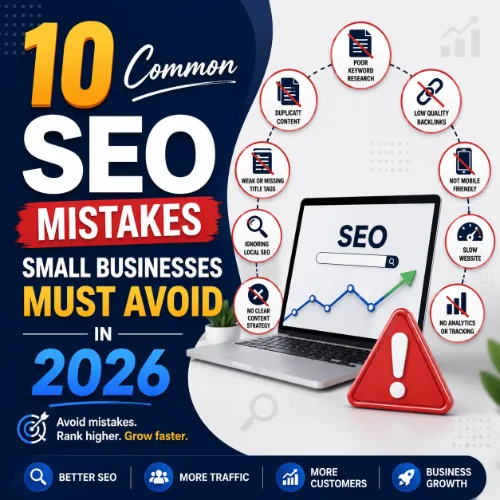
SEO mistakes small businesses Key Takeaways
Running a small business is demanding enough without unknowingly sabotaging your online visibility.
- Neglecting technical SEO (slow load times, broken links, poor mobile experience) is one of the most harmful SEO mistakes small businesses commit.
- Many small businesses ignore local SEO fundamentals, missing out on nearby customers actively searching for their services.
- Failing to create useful, original content and instead relying on thin pages or keyword stuffing undermines long-term search success.
What Are the Most Common SEO Mistakes Small Businesses Make?
Small business owners often wear multiple hats, and SEO can feel like a foreign language. Yet even a few missteps can cost you valuable traffic and leads. Below, we break down the most common errors, explain why they hurt your performance, and give you actionable steps to turn things around. Whether you are just starting your SEO journey or looking to refine your strategy, avoiding these pitfalls will save you time and money. For a related guide, see 13 SEO Content Mistakes Beginners Should Avoid (Expert Guide).
1. Not Claiming and Optimizing Your Google Business Profile
For any local business, your Google Business Profile (GBP) is your digital storefront. One of the biggest SEO mistakes small businesses make is leaving this profile unclaimed, incomplete, or outdated. Without a fully optimized GBP, you are invisible in local search results and Google Maps. For a related guide, see 13 Hyperlocal SEO Ideas That Work: Proven Tactics for Local Search Dominance.
How to fix it: Claim your profile, verify your business, and fill out every section—hours, phone number, website, services, and categories. Add high-quality photos and respond to reviews promptly. Keep your information consistent across all online directories.
2. Ignoring Local SEO and Location-Specific Keywords
A bakery in Austin, Texas, should not be targeting only general keywords like “best bread.” It should be targeting “best sourdough bread in Austin.” Ignoring location-specific phrases is a classic small business SEO mistake. You miss out on traffic from people who are ready to visit your physical location.
How to fix it: Perform keyword research with a focus on city, neighborhood, or service-area terms. Include these in your page titles, meta descriptions, headings, and body content. Use location pages if you serve multiple areas.
3. Neglecting On-Page SEO Fundamentals
Many small business websites lack basic on-page optimization—unique title tags, compelling meta descriptions, and proper heading hierarchy. This is one of the most preventable common SEO errors for small businesses. Search engines rely on these elements to understand what each page is about.
How to fix it: Write a unique, keyword-rich title tag (under 60 characters) and meta description (under 160 characters) for every page. Use one H1 per page (your title), H2s for main sections, and H3s for subsections. Ensure each page targets a single primary keyword.
4. Having a Slow and Mobile-Unfriendly Website
Site speed and mobile responsiveness are ranking factors. A slow, clunky site on mobile drives visitors away and signals poor quality to Google. This SEO mistake can undo all your other efforts.
How to fix it: Use Google’s PageSpeed Insights to diagnose issues. Compress images, leverage browser caching, reduce server response time, and eliminate unnecessary plugins. Choose a responsive theme and test your site on multiple devices.
5. Creating Thin or Duplicate Content
Publishing pages with little substance—like a 50-word service description—or copying content from competitors is a major SEO blunder. Search engines penalize thin and duplicate content because it offers no value to users.
How to fix it: Write original, in-depth content for each service, product, or blog post. Aim for at least 500–800 words per core page, and ensure every sentence adds value. Use canonical tags to consolidate similar pages. Regularly audit your site for duplicate content.
6. Keyword Stuffing Instead of Natural Optimization
Repeating a target keyword excessively in a page does not work anymore. It reads unnaturally and can trigger algorithmic penalties. This outdated tactic remains one of the most persistent SEO mistakes small businesses make, especially when copying old advice.
How to fix it: Use your focus keyword once in the H1, once or twice in the first 100 words, and 2–3 more times naturally throughout the content. Use synonyms and related terms (LSI keywords). Write for humans first, then optimize for search engines.
7. Overlooking Internal Linking
Internal links help search engines discover your pages and distribute authority across your site. Many small businesses have “orphan” pages—pages with no internal links pointing to them. That is a missed opportunity for both users and bots.
How to fix it: Create a logical site structure. Link from your homepage to your most important service or product pages. In blog posts, link to relevant service pages and other related articles. Use descriptive anchor text that includes keywords where relevant.
8. Using Broken or Low-Quality Backlinks
Backlinks remain a powerful ranking signal, but not all backlinks help. Links from spammy directories, paid link networks, or irrelevant sites can hurt your credibility. Chasing links without vetting the source is a common small business SEO mistake.
How to fix it: Build links naturally through guest posting, local partnerships, and creating shareable content (infographics, guides, original research). Disavow toxic backlinks using Google’s disavow tool if you see a drop in rankings. Quality always beats quantity.
9. Forgetting to Track and Analyze Your SEO Performance
You cannot improve what you do not measure. Many small businesses set up SEO and then never check Google Search Console, Google Analytics, or their keyword rankings. This leads to blind optimization and wasted effort.
How to fix it: Set up Google Analytics and Google Search Console. Monitor your top landing pages, organic traffic trends, click-through rates, and keyword positions. Use a simple spreadsheet or an SEO dashboard to review metrics monthly and adjust your strategy.
10. Giving Up Too Soon on SEO
SEO is a long-term investment, not a quick fix. After a few weeks without results, some small business owners abandon their efforts or switch tactics entirely. This is the most costly of all common SEO errors for small businesses.
How to fix it: Set realistic expectations. It can take 3–6 months to see meaningful movement for competitive terms. Stay consistent with content creation, link building, and technical maintenance. When you see growth, double down on what works.
How to Start Fixing Your SEO Mistakes Small Businesses Face
Now that you know the top ten mistakes, take action. Start with a quick site audit using free tools like Google’s PageSpeed Insights, Mobile-Friendly Test, and Google Search Console. Prioritize fixes that impact user experience and visibility the most—like site speed, local SEO, and on-page basics. Schedule monthly reviews of your progress, and do not hesitate to invest in a professional audit or consultation if your budget allows. Consistent, patient effort is the real secret to SEO success.
Useful Resources
For a deeper understanding of technical SEO and site audits, check out Google’s SEO Starter Guide. To learn more about local SEO best practices, visit Moz’s Local SEO Guide.
Frequently Asked Questions About SEO mistakes small businesses
What is the biggest SEO mistake small businesses make?
Many experts agree the biggest mistake is ignoring local SEO and failing to claim or optimize a Google Business Profile. Without a strong local presence, a small business remains invisible to nearby customers searching for their services.
How long does it take to recover from SEO mistakes ?
Recovery time depends on the severity of the mistakes and the competitiveness of your market. Minor fixes (like updating meta tags) can show improvements in days or weeks, while recovering from a penalty or rebuilding lost backlinks can take several months.
Can small businesses do SEO themselves?
Yes, small businesses can handle basic SEO—keyword research, on-page optimization, content creation, and local listing management. However, technical SEO, competitive link building, and advanced analytics often require professional help or a significant time investment.
How much should a small business spend on SEO per month?
Costs vary widely based on goals and competition. A DIY approach costs only your time. Hiring a freelancer may range from $500–$2,000 per month, while a reputable agency can charge $1,500–$5,000+. Focus on ROI, not the lowest price.
Is keyword stuffing still a problem in 2026?
Yes, keyword stuffing remains an issue, especially among beginners. Google’s algorithms easily detect unnatural repetition, and it can lead to lower rankings or manual penalties. Natural, context-driven use of keywords is always the better approach.
How do I know if my site has duplicate content?
You can use tools like Siteliner or Copyscape to scan for duplicate content. Also, check Google Search Console for indexing issues, and use a site:yourdomain.com search to see if multiple pages with the same content are indexed.
What is the fastest way to improve local SEO?
Optimizing your Google Business Profile is the fastest win. Ensure your name, address, and phone number are consistent everywhere. Collect positive reviews from real customers, and post updates (special offers, events) to your profile regularly.
Should I remove old, underperforming blog posts?
Not necessarily. Instead of deleting them, consider updating or consolidating old posts. Refresh facts, add new information, improve formatting, and link to newer, more authoritative pages. Deletion can lose accumulated links and traffic.
How many backlinks do small businesses need?
Quality matters more than quantity. A few backlinks from trusted, local, or niche-relevant sites (like a local chamber of commerce or industry blog) can be more valuable than dozens of links from low-quality directories. Focus on earning relevant, natural links.
Does site speed really affect rankings for local businesses?
Yes, site speed affects both user experience and rankings. Google has used page speed as a ranking factor for years. A slow site increases bounce rates, which can signal lower quality and indirectly hurt your local search performance.
What is the best free SEO tool for small businesses?
Google Search Console is invaluable—it shows search performance, indexing issues, and mobile usability. Combined with Google Analytics and PageSpeed Insights, you have a robust free toolkit for tracking and fixing common issues.
How often should I update my website for SEO?
Ideally, publish new content (blog posts, news, updates) at least once a week. Also, refresh existing high-traffic pages annually or when industry information changes. Regular updates signal to search engines that your site is active and relevant.
Do I need separate pages for each location?
If you serve multiple cities or have physical locations, creating a dedicated page for each is highly beneficial. Each page should include unique content, local keywords, contact details, and testimonials from that area. Avoid simply copying the same text.
What is the difference between on-page and off-page SEO?
On-page SEO refers to elements you control on your website—content, title tags, meta descriptions, headings, images, and internal links. Off-page SEO involves external factors like backlinks, social media mentions, and local citations that build your site’s authority.
Can I use the same title tag on multiple pages?
No, each page should have a unique title tag. Duplicate title tags confuse search engines and can harm your click-through rate. A unique, descriptive title for every page helps users and bots understand what each page is about.
How do I fix a slow WordPress site?
Start by optimizing images (compress without losing quality), using a caching plugin (like WP Rocket or W3 Total Cache), updating PHP and plugins, and choosing a reliable hosting provider. Eliminate unnecessary plugins and choose a lightweight theme.
What happens if I ignore mobile optimization?
Since Google uses mobile-first indexing, a poor mobile experience can cause your site to rank lower for all users. High bounce rates from mobile visitors also hurt your bounce rate signal, which can indirectly affect rankings.
Should I hire an SEO agency or do it myself?
It depends on your budget, time, and expertise. DIY SEO works for basic tasks, but an agency brings tools, experience, and an outside perspective. If you are competing in a competitive industry, hiring an expert often delivers faster and better results.
What are structured data and schema markup?
Structured data (schema markup) is code added to your site to help search engines understand your content better. It can enable rich results like star ratings, FAQs, event times, and product prices. It is not a direct ranking factor but can improve click-through rates.
How do I recover from a Google penalty?
First, identify the cause via a Google Search Console message. Common causes include unnatural links, thin content, or keyword stuffing. Remove or disavow bad links, improve site quality, and submit a reconsideration request. Recovery can take weeks or months.