
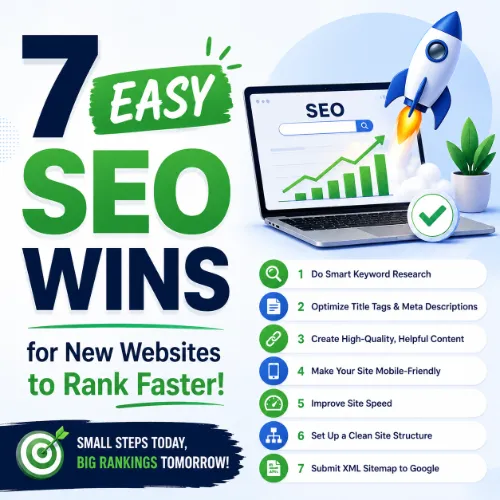
easy SEO wins for new websites Key Takeaways
Getting a new website to rank in search results can feel overwhelming, but a few focused actions make a big difference.
- Start with the right SEO for new websites foundation — optimizing titles, meta descriptions, and headings for your target keywords.
- Improve your site’s technical health by fixing broken links, improving page speed, and making sure Google can crawl your pages.
- Build early authority with simple content and backlink strategies that even beginners can use.
Why easy SEO wins for new websites Matter Right Now
When you launch a new site, every search engine starts with zero trust for your domain. Getting indexed and ranked requires showing Google that your content is relevant, useful, and reliable. The easy SEO wins for new websites outlined here address exactly those signals: relevance (keywords and content), usability (speed and mobile-friendliness), and trust (quality backlinks and clear structure).
Implementing even two or three of these tactics can push your site from “invisible” to “visible” within weeks. The key is consistency and avoiding common mistakes that waste time or trigger penalties. For a related guide, see 7 Simple SEO Strategies for New Websites: Avoid Common Mistakes.
Step 1: Optimize Your Page Titles and Meta Descriptions
Your page title and meta description are the first things people see in search results. They’re also ranking signals. For each important page, write a title that includes your primary keyword and a clear benefit. Keep titles under 60 characters so they don’t get cut off.
Meta descriptions should be 150–160 characters, include the same keyword, and end with a call to action like “Learn more” or “Get started.” Avoid duplicate descriptions across pages. Use a plugin like Yoast SEO or Rank Math to edit them easily.
Step 2: Improve Your Site’s Crawlability and Indexability
If Google can’t find your pages, they can’t rank. Submit your sitemap to Google Search Console and make sure your pages are set to “index, follow.” Use internal links to connect related content and avoid orphan pages (pages with no links pointing to them).
Check your robots.txt file to ensure it’s not blocking important pages. Use the URL Inspection tool in Search Console to see exactly how Google views each URL.
Step 3: Target Low-Competition Keywords First
Chasing high-volume, competitive terms from day one is a losing game. Instead, focus on long-tail keywords with lower keyword difficulty (KD) but clear search intent. For example, instead of “shoes,” target “affordable running shoes for flat feet.”
Use Ahrefs’ Keywords Explorer or Google’s Keyword Planner to find queries with search volume between 100 and 1,000 per month and a KD under 20. Create content that directly answers the question behind the keyword.
Step 4: Create High-Quality, Topically Relevant Content
Thin content does not rank. Each page should provide genuine value: a how-to guide, a comparison, a list of resources, or original research. Aim for at least 1,000 words per informational article, but never pad for word count.
Organize your content with clear H2 and H3 headings that include your keywords. Use short paragraphs, bullet points, and images to improve readability. Google’s Helpful Content Update rewards content that satisfies user intent.
Step 5: Earn a Few Early, Relevant Backlinks
Backlinks are still a top ranking factor. As a new site, you don’t need hundreds of links. Focus on quality over quantity. Reach out to industry blogs, local business directories, or resource pages and offer a guest post, testimonial, or case study that includes a link back to your site. For a related guide, see 12 Proven Digital PR Ideas for SEO That Build Expert Links.
Avoid link farms, paid links, or irrelevant directory submissions. They can trigger manual penalties and harm your reputation. Use Ahrefs’ Site Explorer to check the referring domains of competitor sites and identify realistic link opportunities.
Step 6: Boost Page Speed and Mobile Usability
Core Web Vitals are ranking signals. Use Google’s PageSpeed Insights tool to identify issues like slow server response times, unoptimized images, or render-blocking JavaScript. Compress images, enable browser caching, and consider a content delivery network (CDN) to speed up global load times.
Test your site on mobile devices. Use a responsive design, ensure buttons are easy to tap, and avoid intrusive pop-ups that hurt the user experience on smaller screens.
Step 7: Leverage Internal Linking and Site Structure
A logical site structure helps both users and search engines navigate your content. Use a shallow hierarchy: homepage → category pages → individual posts or products. Every page should be reachable within three clicks from the homepage.
Add contextual internal links within your content. If you mention “SEO for new websites” in one article, link to another related article on your site. Use descriptive anchor text that includes the target keyword where natural.
SEO Entities and Their Functions
Understanding key SEO entities helps you make better decisions. Here’s what each term means in practice:
- Keyword Difficulty (KD) — A score in Ahrefs (0–100) that estimates how hard it is to rank for a keyword. Lower KD means less competition, which is ideal for new sites.
- Referring Domains — The number of unique websites linking to yours. More quality referring domains often correlate with higher rankings.
- Domain Rating (DR) — An Ahrefs metric that measures the overall link strength of your entire site. New sites start low and grow with each quality backlink.
- Crawl Budget — The number of pages Google will crawl on your site within a given timeframe. A clean site structure and fast load times maximize yours.
- SERP Features — Special result types like featured snippets, People Also Ask boxes, and local packs. Optimizing for them can give you extra visibility without ranking #1.
- Broken Backlinks — Links from other sites pointing to pages that no longer exist. Finding and redirecting them preserves link equity and improves user experience.
Useful Resources
To go deeper into SEO for new websites, check out these authoritative guides:
- Google’s SEO Starter Guide — The official basics covering crawlability, content, and technical setup.
- Ahrefs SEO Basics Guide — A practical walkthrough of keyword research, link building, and analytics for beginners.
Frequently Asked Questions About easy SEO wins for new websites
What is the first SEO action I should take on a new website?
Submit your sitemap to Google Search Console and create a robots.txt file. This tells Google which pages to crawl and index. Without it, your site might stay invisible for weeks.
How long before SEO results show on a new website?
Usually 3 to 6 months for consistent organic traffic. Some low-competition keywords can rank within 2–4 weeks, but building authority takes time.
Can I do SEO myself without hiring an expert?
Yes. Basic SEO like keyword optimization, meta tags, internal linking, and speed improvements are manageable for most beginners. Complex technical issues may need professional help.
How many keywords should I target per page?
One primary keyword and 2–3 secondary related keywords per page. Overstuffing confuses search engines and hurts readability.
What is keyword difficulty and why does it matter?
Keyword difficulty estimates how hard it is to rank for a term. For new sites, target keywords with difficulty under 30 to maximize early wins.
How do I find keywords with low competition?
Use Ahrefs Keywords Explorer, Google Keyword Planner, or Ubersuggest. Filter by keyword difficulty under 20 and search volume between 100 and 1,000.
Is content length important for ranking?
Longer content tends to rank better, but only if it’s comprehensive and useful. 1,000–1,500 words is a good baseline for informational posts. Focus on depth, not padding.
How do I earn backlinks as a new site?
Write guest posts for relevant blogs, contribute to industry roundups, list your site in quality directories, or offer a free tool or resource that naturally attracts links.
What are dofollow and nofollow links?
Dofollow links pass ranking authority to your site. Nofollow links don’t pass authority but can still drive traffic. A natural link profile contains both.
Should I fix broken links on my website?
Yes. Broken links hurt user experience and waste crawl budget. Use a tool like Ahrefs Site Audit or Screaming Frog to find and redirect broken URLs.
What is crawl budget and how do I manage it?
Crawl budget is the number of pages Google will crawl in a time period. Improve site speed, fix broken links, and block low-value pages with robots.txt to conserve it.
How do I optimize images for SEO?
Use descriptive file names (e.g., “red-running-shoes.jpg”), add alt text with keywords, compress images with TinyPNG, and serve them in WebP format where possible.
What is a meta description and do I need one?
A meta description is a 150–160 character snippet that appears in search results. It doesn’t directly affect rankings but improves click-through rate, so include one on every page.
How often should I publish new content?
Consistency matters more than frequency. Aim for at least one article per week. Quality and relevance to your audience are more important than daily posting.
What is internal linking and why is it important?
Internal links connect pages on your site, distributing link equity and helping Google understand site structure. Use descriptive anchor text and link to relevant, deeper content.
How do I check if my site is mobile-friendly?
Use Google’s Mobile-Friendly Test tool. It evaluates page design, text size, and tap targets. If issues appear, use a responsive theme and test on real devices.
What is a featured snippet?
A featured snippet is a highlighted answer at the top of Google’s search results. Target questions, use clear formatting, and include a direct answer in your content to increase your chances.
Should I use an SEO plugin?
Yes. Plugins like Yoast SEO or Rank Math simplify title optimization, XML sitemaps, meta tags, and readability checks. They are essential for beginners.
What are Core Web Vitals?
Core Web Vitals are three loading, interactivity, and visual stability metrics. They are ranking signals. Improve Largest Contentful Paint (LCP), First Input Delay (FID), and Cumulative Layout Shift (CLS) for better performance.
How do I track my SEO progress?
Use Google Search Console for clicks, impressions, and rankings. Ahrefs or SEMrush can track keyword positions and backlinks. Check monthly for improvement in organic traffic and keyword rankings.