
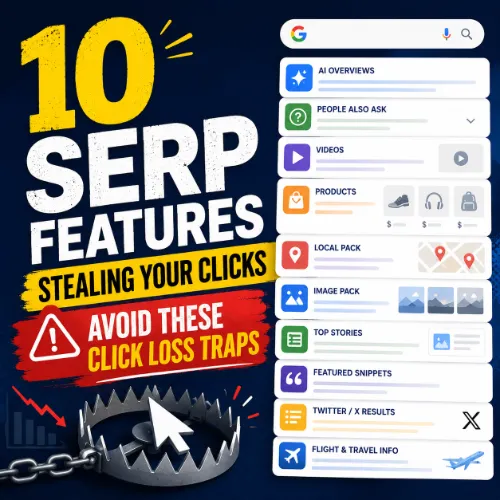
SERP features stealing clicks Key Takeaways
SERP features like featured snippets, People Also Ask boxes, and local packs increasingly dominate Google’s search results, often pushing traditional organic listings below the fold.
- Identify the ten SERP features stealing clicks from your organic listings, including zero-click results and visual carousels.
- Learn practical, data-backed tactics to optimize for each feature and minimize click loss.
- Discover how to use SERP analysis tools to turn these competitors into opportunities for visibility.
Why Understanding SERP Features Stealing Your Clicks Matters
Imagine running a marathon, training for months, only to find the finish line has moved. That’s what it feels like when your content ranks on page one of Google but gets fewer clicks than expected. The culprit? SERP features stealing clicks. These are the rich result types — snippets, knowledge panels, video blocks — that answer user queries directly on the search results page, reducing the need to click through to any website. For SEO professionals, this is both a threat and an opportunity. By learning what each feature does and why it attracts clicks, you can adapt your content strategy to win visibility within those features or optimize your pages to stand out despite them. For a related guide, see 10 Proven Citation Building Techniques for Local SEO Success.
The Top 10 SERP Features Stealing Clicks
Below are the most common SERP features that reduce organic traffic, along with a practical tip to either leverage or mitigate each one.
1. Featured Snippets
Featured snippets appear in a box at the top of Google’s organic results, often called “position zero.” They pull a concise answer from a webpage and display it directly. For many queries, this means users get their answer without clicking anything. Why it steals clicks: The snippet satisfies the query instantly. Tip: Structure your content with clear, direct answers to common questions. Use bullet points, numbered lists, and short paragraphs to increase your chances of being selected. Even if you don’t get the snippet, you can often rank just below it in position one.
2. People Also Ask (PAA) Boxes
PAA boxes show a set of related questions that expand when clicked. They keep users engaged on the SERP, often preventing any click at all. Why it steals clicks: Users click through the expandable questions and find all their answers on Google. Tip: Identify PAA questions for your target keyword using tools like Ahrefs’ Keyword Generator. Then create a dedicated FAQ section on your page that answers each question clearly, increasing the odds of being featured in the PAA.
3. Knowledge Panels
Knowledge panels appear in a sidebar, typically for entities like businesses, celebrities, or landmarks. They pull data from trusted sources like Wikipedia and Google’s Knowledge Graph. Why it steals clicks: Users get a comprehensive overview without leaving Google. Tip: Claim and optimize your Google Business Profile. Ensure your structured data (Schema.org markup) is accurate and complete, especially for Organization, LocalBusiness, and Person schemas.
4. Local Packs
Local packs display a map and three local business listings for queries with local intent (e.g., “plumber near me”). Why it steals clicks: Users often call or visit the business directly from the pack. Tip: Optimize your Google Business Profile with correct NAP (Name, Address, Phone), categories, reviews, and photos. Build local citations to reinforce your authority. For non-local content, use locations or geo-modifiers in your titles to target local intent.
5. Image Packs
Image packs appear as a horizontal row of images, usually on queries where visuals matter (e.g., “modern kitchen design”). Why it steals clicks: Users click the image to see it larger, often staying on Google Images. Tip: Optimize your images with descriptive alt text, proper file names, and high-quality compressed files. Use structured data (ImageObject) to help Google understand and surface your images.
6. Video Carousels
Video carousels show a horizontal scroll of video thumbnails, typically from YouTube. Why it steals clicks: Users click the video thumbnail and get what they need without visiting your site. Tip: Create short, answer-focused videos for queries that commonly trigger video results. Embed these videos on your relevant blog posts and optimize the video title, description, and tags for the target keyword.
7. Top Stories (News Carousel)
Top Stories appears as a carousel of recent news articles, often for trending or time-sensitive queries. Why it steals clicks: Users click on timely headlines from multiple publishers. Tip: If your content covers a news topic, ensure it is properly tagged with NewsArticle schema. Use a fast, mobile-friendly design and publish authoritative, original reporting to qualify for inclusion.
8. Shopping Results (Product Listings)
Shopping results show product images, prices, and reviews directly on the SERP, often in a grid. Why it steals clicks: Users compare products and prices without leaving Google. Tip: Use Product structured data on your ecommerce product pages. Include high-quality images, competitive pricing, and review snippets to stand out in both organic and paid shopping results.
9. AI Overviews (SGE)
Google’s AI-generated overviews (formerly SGE) provide a summary answer with links to sources. Why it steals clicks: Users get a synthesized answer without needing to click further. Tip: Focus on creating authoritative, well-cited content that Google’s AI might cite. The AI overview often links to the source pages, so a cited mention can still drive traffic. Use clear headings, bullet points, and data tables to increase readability.
10. Sitelinks
Sitelinks are additional links that appear under a domain’s main listing, helping users navigate directly to subpages. Why it steals clicks: While they can increase click-through rate for your own site, they also keep users on your site hierarchy, potentially bypassing other pages you want to promote. Tip: Use clear site navigation and internal linking to help Google identify your most important pages. Monitor your sitelinks using Google Search Console and disallow any unwanted ones using the URL removal tool.
How to Audit Your Own SERP Features Stealing Clicks
To reclaim your traffic, you need to know which features are affecting your specific keywords. Here’s a simple process:
- Run a SERP analysis: Use a tool like Ahrefs’ SERP Checker to see which features appear for your target keywords.
- Review your click-through rate (CTR): Compare your average CTR for keywords with and without dominant SERP features.
- Prioritize opportunities: Focus on keywords where you have a realistic chance to earn a featured snippet or appear in a PAA box.
- Adapt your content: Reformat existing high-potential pages with clear Q and A sections, structured lists, and concise definitions.
SEO Entities and Their Functions
To make informed decisions about which SERP features to target, you need to understand the entities that define your search landscape. Here’s how they work in practice: For a related guide, see 13 Hyperlocal SEO Ideas That Work: Proven Tactics for Local Search Dominance.
- Keyword entities: Organic keywords with featured snippets, PAA opportunities, and low KD scores are your best bets for winning zero-click real estate.
- Backlink entities: Referring domains to your content help Google trust your authority, which is critical for being chosen as a featured snippet source.
- Page entities: Your top pages by traffic are the ones most likely to be affected by SERP features. Audit them first.
- SERP entities: Understanding which features appear for each query — like video carousels or local packs — determines your content format strategy.
- Competitor entities: Competing domains that already rank in featured snippets can be analyzed for content gaps you can fill.
Useful Resources
For deeper dives into specific SERP features and optimization tactics, check out these authoritative guides:
- Google’s Search Gallery — Official documentation on all structured data types that trigger rich results.
- Ahrefs’ Featured Snippet Guide — Practical strategies for winning position zero from one of the leading SEO tools.
Understanding the SERP features stealing clicks is essential for any modern SEO strategy. By auditing your keywords, optimizing your content for featured snippets and PAA, and using structured data correctly, you can transform these click-loss traps into valuable traffic opportunities.
Frequently Asked Questions About SERP features stealing clicks
What are the most common SERP features stealing clicks ?
Featured snippets, People Also Ask, local packs, and AI overviews are the top four features that reduce organic click-through rates because they answer queries directly on the SERP.
How much traffic do SERP features steal?
Studies show that featured snippets alone can reduce organic CTR by 20-50% for the page that previously ranked in position one. The total impact depends on the query type and device.
Can you avoid SERP features stealing clicks ?
You can’t prevent Google from showing features, but you can optimize your content to appear within them, thereby turning a threat into a traffic opportunity.
How do I know which SERP features affect my keywords?
Use a SERP analysis tool like Ahrefs, Semrush, or Moz to check which rich result types appear for each keyword in your portfolio.
Is it worth targeting featured snippets?
Yes, if your content can win position zero, you gain visibility above all other organic results. Even if CTR drops slightly, the increased exposure often leads to more overall traffic.
Do AI overviews replace featured snippets?
Not entirely. While AI overviews appear for some queries, featured snippets still dominate for specific question-based queries. Both can coexist in the same SERP.
How do I optimize for People Also Ask?
Identify PAA questions for your keyword, then create a dedicated FAQ section on your page that answers each question concisely in 40-60 words.
What types of content win featured snippets?
Clear, direct answers formatted as bullet points, numbered lists, or short paragraphs — especially for “what is,” “how to,” and definition-type queries.
Do image packs steal clicks from all types of sites?
Mostly from sites that rely on visual content like design, fashion, and travel blogs. For those niches, optimizing images is critical to reclaim clicks.
How can I reduce click loss from local packs?
Optimize your Google Business Profile, earn positive reviews, and build local citations. Non-local content can avoid local packs by targeting broader, non-geo queries.
Do video carousels steal clicks from text-based content?
Yes, for queries where users prefer watching over reading (e.g., “how to bake a cake”). Creating a short, helpful video can help you capture those clicks instead.
What is the best way to monitor SERP feature changes?
Use rank tracking tools that show which SERP features are present for each keyword, and set up automated reports to track fluctuations weekly.
How important is structured data for preventing click loss?
Very important. Structured data helps Google understand your content and can qualify you for rich results like product snippets, recipes, and FAQs.
Can sitelinks actually hurt my CTR?
Rarely. Sitelinks typically improve CTR by giving users direct navigation. However, they can send traffic to subpages you don’t want to prioritize. Use Search Console to adjust them.
What role does search intent play in click loss?
A huge role. Informational queries are more prone to zero-click features. Commercial and transactional queries usually still generate clicks because users need to compare or purchase.
How do SERP features stealing clicks differ on mobile vs. desktop?
On mobile, features take up more screen real estate, causing organic results to appear even lower down the page. Click loss is typically more severe on mobile.
Should I avoid targeting keywords with dominant SERP features?
Not entirely. Many features like featured snippets and PAA can be won with proper optimization. Focus on keywords where you can realistically compete for those features.
How long does it take to see results from optimizing for SERP features?
It varies, but many case studies show improvements in 2-4 weeks if you reformat existing content. For new content, expect 4-8 weeks for Google to index and evaluate.
What is the biggest mistake people make when trying to combat click loss?
Focusing only on ranking higher without checking what SERP features are present. You can rank first but still get zero clicks if a featured snippet answers the query.
Do SERP features stealing clicks affect all industries equally?
No. Informational industries like health, tech, and finance see heavy snippet competition. Local businesses face challenges from local packs. Ecommerce sites are hit by shopping results.