
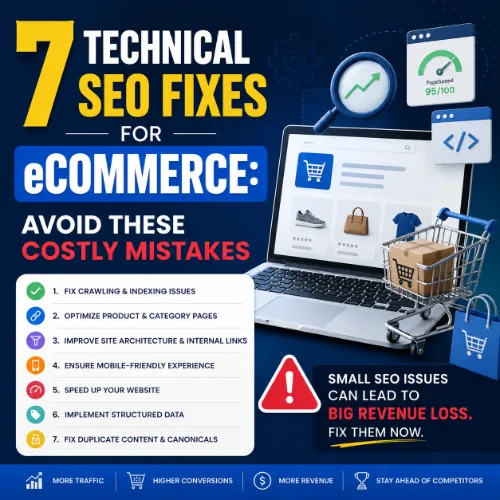
technical SEO fixes for eCommerce Key Takeaways
Running an online store means juggling thousands of product pages, category layers, and dynamic filters.
- Apply these technical SEO fixes for eCommerce to fix crawl budget leaks, pagination problems, and thin product pages.
- Core Web Vitals, structured data, and site architecture drive measurable lifts in organic clicks and conversions.
- Regular site audits catch issues early and keep your store competitive in 2025 SERPs.
Why technical SEO fixes for eCommerce Matter Now
Running an online store means juggling thousands of product pages, category layers, and dynamic filters. Without intentional technical SEO fixes for eCommerce, search engines struggle to find your best content. The result? Low crawl efficiency, orphan pages, and missed revenue. Google rewards stores that load fast, present clean data, and avoid duplicate content traps. Let’s walk through seven actionable fixes that directly improve your store’s visibility and bottom line. For a related guide, see 8 Shopify SEO Mistakes to Avoid: Essential Fixes for Higher Rankings.
Fix #1: Optimize Crawl Budget by Pruning Low-Value Pages
Large eCommerce sites waste crawl budget on thin category pages, filtered URLs with thousands of parameters, and out-of-stock product pages. Search engines stop crawling deeper, valuable pages when they hit too many low-value URLs. For a related guide, see 11 Proven Ways to Boost eCommerce CTR Instantly.
Actionable Steps
- Use Google Search Console’s Crawl Stats report to see which pages Googlebot hits most often.
- Block parameter-heavy URLs (e.g.,
?sort=price and color=red) with robots.txt ormeta robots noindexif they add no unique content. - Set out-of-stock products to
404or redirect to a related category, instead of leaving them indexable. - Consolidate thin seasonal landing pages into evergreen resources where possible.
Fix #2: Fix Pagination and Infinite Scroll for Better Indexing
Pagination creates duplicate title tags and causes Google to miss products on page 3 or beyond. Infinite scroll without proper URL updates compounds the problem.
Actionable Steps
- Implement
rel="next"andrel="prev"on paginated series (Google still supports this hint). - Use
view-allpages only if they load acceptably fast; otherwise let pagination work with clear canonical tags. - For infinite scroll, update the browser URL via
history.pushStateand add anoindex, followon parameter-generated page two and beyond if they don’t add unique content.
Fix #3: Eliminate Duplicate Product and Category Content
Duplicate product descriptions, manufacturer descriptions, and similar category pages confuse search engines and dilute ranking power. This is one of the most impactful eCommerce SEO tips because duplicate content often goes unnoticed at scale. For a related guide, see 10 Product Page SEO Optimizations to Avoid Costly Mistakes.
Actionable Steps
- Write unique 150–250 word product descriptions for each SKU, even if variants share similar specs.
- Use self-referencing canonical tags on every product and category page.
- Add
noindextags on sort/filter pages that duplicate the parent category. - Merge near-identical categories (e.g., “Men’s Shoes” and “Shoes for Men”) into one with a 301 redirect.
Fix #4: Accelerate Core Web Vitals for Mobile and Desktop
Core Web Vitals—LCP, FID/INP, CLS—directly influence rankings. eCommerce pages often fail due to large images, heavy JavaScript, and third-party scripts from analytics or chatbots.
Actionable Steps
- Compress product images to WebP or AVIF format with next-gen encoding.
- Lazy load below-the-fold images and videos.
- Defer non-critical JavaScript and remove unused code via code splitting.
- Use a CDN and enable compression (Brotli or Gzip).
- Monitor real-user data in Search Console’s Core Web Vitals report weekly.
Fix #5: Implement Product Schema (Structured Data) Correctly
Rich results, including price, availability, and review stars, drive higher click-through rates. Incorrect or missing schema leaves your products invisible in competitive SERP features.
Actionable Steps
- Add
Productschema withname,description,sku,offers(price, currency, availability), andaggregateRatingif reviews exist. - Use
BreadcrumbListschema to show clear navigation paths. - Validate your markup using Google’s Rich Results Test.
- Update schema dynamically when product prices or stock change.
Fix #6: Optimize Site Architecture and Internal Linking
Flat architecture distributes authority evenly. Buried product pages lose ranking opportunities. Logical internal linking also helps users find products faster.
Actionable Steps
- Keep important product pages within 3 clicks of the homepage.
- Use descriptive, keyword-rich anchor text in category navigation and related product sections.
- Add breadcrumbs to every page for user orientation and internal link equity flow.
- Audit orphan pages using a crawler and either link to them or consolidate their content.
Fix #7: Monitor and Fix Broken Internal and External Links
Broken links frustrate users and waste crawl budget. For eCommerce, broken product links from discontinued items or changed URLs are common and damaging.
Actionable Steps
- Run a monthly crawl with a tool like Screaming Frog or Sitebulb to find 404s.
- Set up 301 redirects for any product URL that changes.
- Fix broken external links to partner or supplier pages.
- Use Search Console’s “Page indexing” report to identify soft 404s and missing pages.
SEO Entities and Their Functions
Understanding the key entities involved in technical SEO helps you prioritize fixes and measure progress. Here are the most relevant ones for eCommerce:
- Root domain and subdomain – Crawl issues at the root affect all subfolders; subdomains like blog.example.com should be treated as separate properties in analytics and Search Console.
- Crawl issues – Errors, redirects, and blocked resources reported in Search Console and crawlers highlight what prevents Googlebot from accessing or indexing pages.
- Canonicals and duplicate content – Self-referencing canonicals consolidate signals; duplicate content without proper canonicals dilutes ranking potential.
- Core Web Vitals – LCP, FID/INP, and CLS metrics, measured by field data, directly correlate with organic rankings and user retention.
- Indexability status – Verified via
meta robotstags, X-Robots-Tag headers, and theindexcoverage report; pages excluded from the index cannot rank. - Top pages by traffic – Identifying high-performing product and category pages shows what content resonates, and which technical issues may be limiting further growth.
Useful Resources
Deepen your knowledge with these authoritative guides:
- Google’s SEO Starter Guide – Official technical SEO best practices from Google, covering crawling, indexing, and site structure.
- Core Web Vitals Optimization Guide – web.dev – Practical advice from Chrome engineers on improving LCP, FID, and CLS for eCommerce sites.
Frequently Asked Questions About technical SEO fixes for eCommerce
Implementing these technical SEO fixes for eCommerce will strengthen your store’s foundation, help search engines surface your best products, and ultimately drive more qualified traffic that converts. Start with a full site audit today and pick your first fix—your rankings will thank you.
Frequently Asked Questions About technical SEO fixes for eCommerce
What is technical SEO for eCommerce?
Technical SEO for eCommerce involves optimizing a store’s website infrastructure—crawling, indexing, site speed, structured data, and duplicate content—so search engines can efficiently find, understand, and rank product and category pages.
Why do eCommerce sites need different technical SEO fixes than blogs?
eCommerce sites have dynamic product catalogs, thousands of URLs, faceted navigation, and frequent inventory changes. These unique complexities create crawl budget waste, duplicate content, and slow loading times that standard blogs rarely face.
How often should I perform a technical SEO audit for my online store?
Monthly is ideal for active stores. At minimum, run a full crawl every quarter and monitor Search Console’s coverage and Core Web Vitals reports weekly.
What is crawl budget, and why does it matter for eCommerce?
Crawl budget refers to the number of URLs Googlebot will crawl on your site within a timeframe. On large sites, wasting budget on thin or duplicate pages means Google may miss important product or category pages.
How do I fix duplicate product descriptions without rewriting every page?
Start by adding self-referencing canonical tags. Then prioritize rewriting descriptions for your top-selling 20% of products. For the rest, add at least one unique sentence per product regarding specific features or usage.
Should I noindex category pages?
Generally no—category pages can rank well and aggregate link equity. Only noindex thin, duplicate category pages (e.g., seasonal categories with no unique content) or parameter-driven filtered pages.
What is the best way to handle paginated product listings?
Use rel="next" and rel="prev" to signal pagination. Ensure each page has a unique canonical pointing to itself, and avoid noindex on page 2+ unless those pages have no unique content value.
How do I implement product schema correctly?
Use JSON-LD format for Product schema with fields for name, description, SKU, offers (price and availability), and aggregateRating if you have reviews. Validate with Google’s Rich Results Test.
What are Core Web Vitals, and how do I improve them for a store?
Core Web Vitals are three metrics measuring loading (LCP), interactivity (FID/INP), and visual stability (CLS). Improve them by compressing images, reducing JavaScript, using a CDN, and ensuring ads or embeds reserve space.
Does site speed affect conversions directly, or only SEO?
Both. Faster sites rank higher, but speed also reduces bounce rates and increases conversion rates. A 1-second delay can reduce conversions by 7% for many eCommerce brands.
How do I find and fix orphan product pages?
Run a crawl with a tool like Screaming Frog, then compare crawled URLs against your sitemap. Pages in the sitemap but without internal links are likely orphans. Add contextual links from related categories or products.
Should I block faceted navigation URLs from being indexed?
Yes, in most cases. Faceted URLs (e.g., with sort or filter parameters) often create duplicate content. Use meta robots noindex, follow or manage them via robots.txt directives—but careful with parameter handling in Google Search Console.
What is the role of breadcrumb schema in eCommerce SEO?
Breadcrumb schema enables rich breadcrumb trails in SERPs, improves click-through rates, and helps search engines understand site hierarchy. It’s especially useful for large stores with deep category structures.
How do I fix soft 404 errors on my store?
Soft 404s occur when a page returns a “200 OK” but shows no real content. Check pages that display “out of stock” or “no products found” messages and either return a true 404, redirect to similar content, or add helpful navigation.
What is the difference between a 301 redirect and a canonical tag?
A 301 redirect permanently sends visitors and crawlers from one URL to another. A canonical tag suggests the preferred version when duplicate content exists but both URLs remain accessible. Use 301 for moved pages, canonicals for duplicates.
How do I know if my store has a crawl budget issue?
If Google crawls fewer URLs than you have, or if important new product pages take weeks to appear in the index, you likely have a crawl budget issue. Compare crawled URLs (Search Console) with your total page count.
Do I need a separate SEO strategy for mobile eCommerce pages?
Not a separate strategy, but mobile-first indexing means your mobile site quality directly determines rankings. Ensure product pages load fast on mobile, buttons are tappable, and content is visually complete.
What is JavaScript SEO, and does it affect eCommerce?
JavaScript SEO refers to ensuring content rendered by JavaScript is accessible to search engines. Many modern eCommerce themes use JavaScript for product filters, dynamic pricing, and lazy loading. If not properly server-side rendered or prerendered, Google may miss content.
How long does it take to see results from technical SEO fixes ?
Some improvements—like removing noindex misconfigurations—can show results within days. Structural changes like crawl budget optimization and architecture improvements typically take 4–12 weeks to reflect in organic traffic.
Can I fix all technical SEO issues in one sprint, or should I prioritize?
Prioritize. Fix critical issues first: indexability errors, broken core pages, and major duplicate content. Then move to site speed, schema, and architecture. Tackling everything at once can overwhelm your development resources and lead to mistakes.