
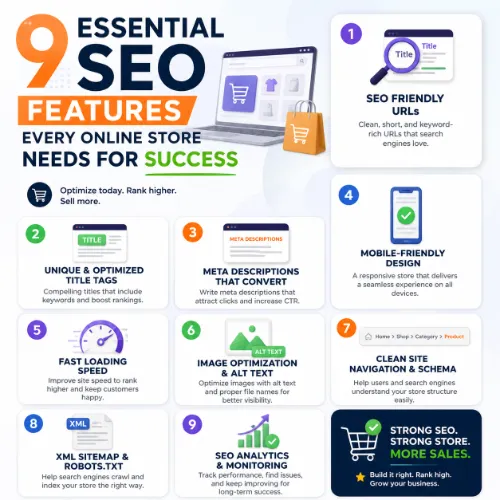
essential SEO features for online store Key Takeaways
If you run a Shopify, WooCommerce, or Magento store, the features listed here apply across platforms.
- Every essential SEO features for online store directly impacts crawlability, keyword targeting, or user experience.
- Technical SEO elements like site speed, structured data, and XML sitemaps support discovery and ranking.
- Strategic content and link-building features help you compete in crowded ecommerce niches.
Why Prioritizing Essential SEO Features for Online Store Boosts Revenue
Organic search drives 40% of ecommerce revenue on average. Yet many store owners focus on paid ads or social media while ignoring the structural and content-based features that make their site visible. Search engines reward stores that load quickly, answer user intent clearly, and build authority through trustworthy signals. For a related guide, see 14 Trusted SEO Authority Signals That Prove Your Site Matters.
If you run a Shopify, WooCommerce, or Magento store, the features listed here apply across platforms. Some require plugins, others need custom development, but every single one pays for itself in increased traffic and conversions.
1. Fast, Reliable Site Performance (Core Web Vitals)
Page speed is a confirmed Google ranking factor. For ecommerce sites, where every second of delay can reduce conversion rates by up to 7%, performance is non-negotiable.
What to optimize
Focus on Largest Contentful Paint (LCP) under 2.5 seconds, First Input Delay (FID) under 100ms, and Cumulative Layout Shift (CLS) under 0.1. Enable browser caching, compress images with modern formats like WebP, and use a content delivery network.
Actionable takeaway
Run your store through Google PageSpeed Insights weekly. Fix any flagged issues before they affect rankings. For WooCommerce stores, a caching plugin like WP Rocket combined with an image optimizer such as Imagify delivers immediate improvements.
2. Clean, Keyword-Optimized URL Structure
Descriptive URLs help both users and search engines understand page content. Avoid strings of numbers or randomized characters. Instead, use readable paths that include target keywords.
Best practices
Keep URLs short and include the primary product or category keyword. Use hyphens between words. For example, yoursite.com/women/running-shoes/nike-air-zoom outperforms yoursite.com/p?id=3847 in click-through rates and ranking signals.
Actionable takeaway
Audit your existing URL structure using a tool like Ahrefs Site Audit. Redirect any legacy messy URLs with 301s to the clean versions.
3. On-Page SEO Elements (Titles, Meta Descriptions, and Headings)
Every product and category page needs a unique title tag, meta description, and heading hierarchy. These elements tell search engines what the page is about and persuade users to click. For a related guide, see 10 Essential SEO Terms Every Beginner Should Know.
Optimization checklist
Title tags should start with the primary keyword, stay under 60 characters, and include your brand name at the end. Meta descriptions should be compelling, under 160 characters, and include a call to action. Use H1 for the page title and H2/H3 for supporting content sections.
Actionable takeaway
Install an SEO plugin like Yoast SEO or Rank Math. Fill in the meta fields for every product, category, and blog post. Never leave the default “No title” placeholder.
4. Structured Data (Schema Markup) for Rich Results
Structured data helps search engines display product information directly in the search results, including price, availability, ratings, and review stars. This is one of the most powerful essential SEO features for online store operators can enable.
Implementation
Use JSON-LD format. For product pages, include Product schema with name, image, description, sku, offers, and aggregateRating when you have reviews. For breadcrumbs, use BreadcrumbList schema.
Actionable takeaway
Test your current schema with Google’s Rich Results Test tool. If missing, install a schema plugin or manually add JSON-LD code to your theme’s header.
5. Strategic Internal Linking Architecture
Internal links distribute link equity across your site and help users discover related products or content. A flat architecture where every page is reachable within three clicks from the homepage is ideal for both users and crawlers.
How to build it
Add contextual links in product descriptions that point to related categories or complementary items. Include a “You Might Also Like” section. Use breadcrumb navigation on every page.
Actionable takeaway
Identify your top-performing pages using Google Analytics. Link from those pages to lower-performing but relevant products or content to boost their visibility.
6. High-Quality, Original Product Descriptions and Category Content
Duplicate or thin content hurts rankings. Many ecommerce sites copy manufacturer descriptions, which results in identical pages across dozens of stores. Original content differentiates your store and signals expertise.
What to write
Write unique descriptions for each product that highlight benefits, usage tips, and unique selling points. For category pages, add 150 to 300 words of editorial content that explains the category’s value or answers common shopper questions.
Actionable takeaway
Start with your 20 best-selling products. Rewrite their descriptions with original copy that includes natural keyword variations. Use a tone consistent with your brand voice.
7. XML Sitemap and Robots.txt Optimization
An XML sitemap provides a roadmap for search engine bots, helping them discover new and updated pages quickly. A well-configured robots.txt file prevents crawlers from wasting resources on irrelevant pages like cart, checkout, or admin areas.
Configuration
Submit your sitemap via Google Search Console. Ensure it includes only canonical pages and excludes parameter-based URLs. In robots.txt, disallow crawling of /cart, /checkout, /my-account, and any staging or duplicate content directories.
Actionable takeaway
Check your current sitemap index in Search Console. If your store has dynamic parameters, enable canonical tags and block unwanted URLs in robots.txt immediately.
8. Mobile-First Design and Responsive Layout
Over 60% of ecommerce traffic comes from mobile devices. Google uses mobile-first indexing, meaning the mobile version of your site determines rankings. A responsive design that adapts to any screen size is not optional. For a related guide, see 15 Essential SEO Tips for Bloggers to Boost Traffic Fast.
Key elements
Ensure buttons are large enough for touch targets, fonts are readable without zooming, and navigation menus collapse nicely on small screens. Test load times on 3G and 4G networks.
Actionable takeaway
Use Google’s Mobile-Friendly Test tool. Fix any elements flagged as too small or too close together. Consider a mobile-aware theme or a mobile-first redesign if your current site feels cramped.
9. Continuous Monitoring with SEO Audit Tools
SEO is not a one-time setup. Search algorithms change, competitors emerge, and technical issues can arise after a theme update or plugin change. Regular auditing ensures your store stays healthy.
What to monitor
Track organic traffic, keyword rankings, crawl errors, broken links, and duplicate content. Tools like Google Search Console, Ahrefs, and Semrush provide comprehensive insights.
Actionable takeaway
Set a monthly reminder to run an SEO audit. Fix any critical issues (404 errors, missing meta tags, slow pages) before they escalate. Use a checklist to stay consistent.
SEO Entities and Their Functions
Understanding the entities behind search analysis makes it easier to choose the right tools and interpret their reports. Below are the key entity categories relevant to ecommerce SEO.
- Website / Domain entities — Root domain, subdomain, and URL-level analysis show whether performance belongs to the whole site, a section like blog.yourstore.com, or a specific product page. This helps identify whether ranking issues are sitewide or localized.
- Keyword entities — Organic keywords, keyword difficulty (KD), search volume, and SERP features reveal demand, competition, and what type of result Google is likely to show (product carousel, reviews snippet, or standard listing).
- Backlink entities — Referring domains, anchor text, and new/lost backlinks indicate authority growth or decline. For ecommerce, links from product review sites or industry publications carry significant weight.
- Page entities — Top pages by links or traffic show which URLs earn the most visibility. Broken pages and internal pages flag opportunities to reclaim lost link equity.
- Technical SEO entities — Crawl issues, redirect chains, and Core Web Vitals expose obstacles that prevent crawling or degrade user experience. Fixing these often produces quick ranking improvements.
Useful Resources
Dive deeper into ecommerce SEO with these authoritative guides:
- Google Product Schema Documentation – Official reference for implementing structured data on product pages.
- Ahrefs Ecommerce SEO Guide – Comprehensive strategy covering technical, on-page, and off-page tactics for online stores.
Frequently Asked Questions About essential SEO features for online store
What are the most important essential SEO features for online store success?
The most critical features include fast page speed, mobile responsiveness, structured data, keyword-optimized URLs, unique product descriptions, internal linking, XML sitemaps, robots.txt configuration, and regular SEO audits. These nine elements form a solid foundation for organic growth.
How does site speed affect ecommerce SEO?
Site speed is a direct ranking factor and heavily impacts user experience. A one-second delay can reduce conversions by 7%. Core Web Vitals, especially LCP, FID, and CLS, are now part of Google’s ranking algorithm.
Do I need a separate mobile version of my store?
No. Responsive design is the recommended approach. It uses the same HTML and CSS that adapts to screen size. This avoids duplicate content issues and simplifies maintenance.
What is structured data and why does it matter for ecommerce?
Structured data, or schema markup, helps search engines display rich results like star ratings, prices, and availability directly in SERPs. This can significantly increase click-through rates and drive more qualified traffic.
Can I use the same product description from the manufacturer?
Using manufacturer descriptions often results in duplicate content penalties or lackluster rankings. Original, unique descriptions that include keywords and address customer questions perform far better.
How often should I update my XML sitemap?
Update your sitemap whenever you add, remove, or significantly change pages. Most ecommerce platforms and SEO plugins regenerate and ping search engines automatically on content changes.
What is the ideal URL structure for a product page?
Short, descriptive, and keyword-rich. For example, yourstore.com/men/shoes/leather-boots. Avoid parameters, dates, or random ID numbers.
How many internal links should a product page have?
There is no strict limit. Focus on quality over quantity. Each page should have at least a breadcrumb trail, a few contextual links in the description, and links from related products or categories.
Do SEO plugins like Yoast or Rank Math help with these features?
Yes. They simplify meta tag management, XML sitemaps, breadcrumbs, schema markup, and content analysis. They are especially useful for WordPress stores.
How can I optimize category pages for SEO?
Add a unique, original description of 150–300 words at the top or bottom of the category page. Use keyword-rich headings, include internal links to subcategories, and ensure clean URLs.
What is the role of robots.txt in ecommerce SEO?
Robots.txt tells search engine crawlers which pages to ignore, such as cart, checkout, or admin pages. Proper configuration prevents wasted crawl budget and keeps your indexed pages focused on products and content.
How do I check if my site is mobile-friendly?
Use Google’s Mobile-Friendly Test tool. It provides a pass/fail assessment and highlights specific issues like text size, touch element spacing, and viewport configuration.
What are Core Web Vitals?
Core Web Vitals are a set of real-world user experience metrics: Largest Contentful Paint (loading speed), First Input Delay (interactivity), and Cumulative Layout Shift (visual stability). They became a ranking signal in 2021.
How can I find broken links on my online store?
Use a site audit tool like Ahrefs or Screaming Frog. They crawl your entire site and list all broken internal and external links. Fix them by updating or redirecting.
Should I noindex my category pages?
Only if the category page has thin content, no unique value, or leads to a filtered product list that creates duplicate content. Otherwise, keep them indexed and optimized.
How do I measure the success of my ecommerce SEO?
Track organic traffic, keyword rankings, conversion rate from organic visitors, and revenue attributed to organic search. Google Analytics 4 and Search Console are the primary tools.
What is a flat site architecture in ecommerce?
A flat architecture means any page is reachable within three clicks from the homepage. It improves crawl efficiency and user navigation. Achieve it by limiting category depth and using cross-linking.
Can schema markup help with voice search?
Indirectly, yes. Structured data helps search engines understand entity relationships, which can improve the chances of your content being used in featured snippets and voice search answers.
How often should I conduct a full SEO audit?
Conduct a full audit at least quarterly. Additionally, run a quick weekly check for crawl errors, broken links, and sudden traffic drops.
Is it worth hiring an SEO consultant for my online store?
If your internal team lacks technical SEO expertise or your store faces heavy competition, a consultant can provide strategic direction, plugin recommendations, and link-building guidance that pays for itself.