
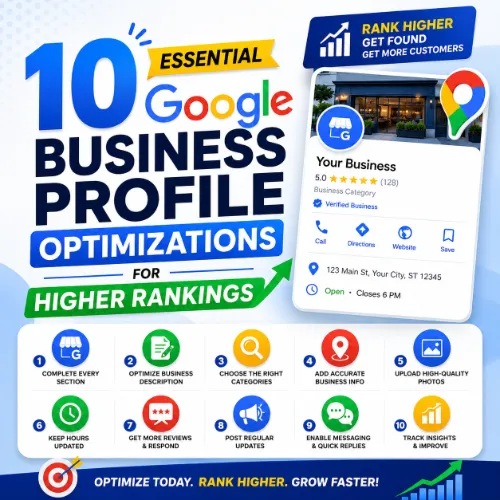
Google Business Profile optimizations Key Takeaways
A fully optimized Google Business Profile is the single most effective local SEO asset for attracting nearby customers.
- Google Business Profile optimizations directly influence local pack rankings and click-through rates.
- Completing every available section, adding high-quality photos, and collecting genuine reviews are foundational for success.
- Regular posts, accurate categories, and proactive Q and #38;A management can set your business apart from competitors.
Why Google Business Profile optimizations Matter for Local Search
When potential customers search for a product or service in their area, Google’s local pack often appears before any organic results. A well-maintained profile signals relevance, proximity, and trust. Businesses that invest in Google Business Profile optimizations see more phone calls, direction requests, and website visits. The difference between a complete, active profile and a neglected one often determines whether a searcher clicks your listing or a competitor’s. For a related guide, see 15 Advanced SEO Strategies Experts Use.
10 Essential Google Business Profile optimizations to Boost Your Rankings
Below are ten proven optimizations, each explained with clear reasoning and actionable steps.
1. Claim and Verify Your Profile
If you haven’t claimed your business on Google, no other optimization matters. Visit the Google Business Profile website, search for your business, and follow the verification steps—usually a postcard by mail, phone, or email. Verification proves you are the legitimate owner, allowing you to edit details and respond to reviews. For a related guide, see 10 Google Search Console Reports You Should Use for Smart SEO Wins.
2. Choose the Most Accurate Primary Category
Your primary category is one of the strongest ranking signals for local search. Select the category that most precisely describes your core service. For instance, a pizza restaurant should choose “Pizza restaurant” rather than “Italian restaurant” if pizza is the main offering. You can also add secondary categories to cover additional services.
3. Complete Every Business Detail
Fill in your business name, address, phone number, website, hours of operation (including special holiday hours), and attributes like “free Wi-Fi” or “wheelchair accessible.” Google rewards completeness. Missing or inconsistent information harms both rankings and user trust.
4. Write a Compelling Business Description
Use the 750-character limit to describe what makes your business unique. Incorporate your focus keyword naturally once or twice—for example, “We specialize in Google Business Profile optimizations for local restaurants.” Avoid keyword stuffing. Focus on customer benefits and your unique selling points.
5. Add High-Quality Photos and Videos
Profiles with photos receive 42% more requests for directions and 35% more click-throughs to websites. Upload at least ten well-lit, professional images of your storefront, interior, team, and products. Add a short video showcasing your space or service. Update visuals seasonally or when you make changes.
6. Collect and Manage Customer Reviews
Reviews are a top local ranking factor and a trust signal for searchers. Encourage satisfied customers to leave feedback by sending a direct review link. Reply to every review—thank positive reviewers and professionally address negative ones. Consistent engagement shows Google that you are active and customer-focused.
7. Post Regularly on Your Profile
Google Posts allow you to share updates, offers, events, and new products directly on your listing. Posts appear in search results and can boost engagement. Aim for at least one post per week. Include a clear call to action, an image, and a link to a relevant page on your website.
8. Use the Q&A Section Proactively
The Questions & Answers section is often overlooked but heavily influences buyer decisions. Monitor incoming questions and respond quickly. You can also post common questions and answers yourself to steer the conversation. For example, “Do you offer free consultations?” with a detailed answer from your profile.
9. Monitor and Respond to Q&A and Messages
Google Business Profile includes a direct messaging feature. Enable notifications and reply within 24 hours. Unanswered messages can lead to lost leads and a poor user experience. The same applies to questions left in the Q&A section—timely responses improve your trust signals.
10. Track Performance with Insights
Use the built-in analytics to see how customers find your profile, what actions they take (calls, direction requests, website clicks), and which keywords trigger your listing. Review this data monthly to adjust your strategy. For example, if “Google Business Profile optimizations” drives many views, emphasize that keyword in posts and your description.
Common Mistakes to Avoid with Google Business Profile optimizations
Even experienced business owners make errors that hurt their local visibility. Avoid these pitfalls:
- Inconsistent NAP: Your name, address, and phone number must match exactly across your website, GBP, and other directories.
- Keyword stuffing in business name: Adding location or service keywords to your official business name violates Google guidelines and can lead to suspension.
- Ignoring negative reviews: Deleting or ignoring critical feedback damages your reputation. Respond respectfully instead.
- Setting wrong hours: Incorrect hours frustrate customers and hurt your trust score.
How to Measure the Impact of Your Google Business Profile optimizations
After implementing these changes, track performance using GBP Insights. Look for increases in profile views, search queries, and customer actions. Compare month-over-month data. If you see a drop in phone calls, review your call-to-action settings or check if your phone number changed. Consistent monitoring lets you double down on what works and fix what doesn’t.
Useful Resources
For deeper guidance on local SEO best practices, visit these authoritative sources:
- Google Business Profile official guidelines – The definitive source for policy compliance and best practices.
- Moz Local Search Ranking Factors – Research-backed insights into what drives local search rankings.
Implement these Google Business Profile optimizations and monitor your local rankings over the next 30 days. Start with the first optimization today, and move through the list one by one. Your local customers are searching—make sure they find you. For a related guide, see 7 Best AI Tools for Google Business Profile Optimization in 2025.
Frequently Asked Questions About Google Business Profile optimizations
How many categories should I add to my Google Business Profile?
You can add up to ten categories. Start with the most specific primary category, then add secondary categories that accurately reflect additional services. Avoid irrelevant categories just to gain impressions.
Do photos really affect Google Business Profile rankings?
Yes. Businesses with photos receive more engagement, and engagement signals positively affect rankings. Google also uses image quality and freshness as a trust indicator.
How often should I post on my Google Business Profile?
Post at least once per week. More frequent posts (2–3 per week) can further increase visibility, especially when tied to offers or events. Consistency matters more than volume.
Can I edit my Google Business Profile after verification?
Yes. You can edit all sections after verification. Some edits may require re-verification, especially if you change your business name or category. Small edits like hours or description are usually immediate.
What is the difference between a primary and secondary category?
Your primary category is the main service you provide and carries the most weight in local ranking. Secondary categories are additional services you offer and help Google understand your full range.
How do I respond to a negative review professionally?
Thank the reviewer for their feedback, acknowledge their concern without being defensive, and offer a solution or invite them to contact you privately. A calm, helpful tone can often turn a negative into a positive impression for others reading.
Should I add my website link to my Google Business Profile?
Yes. Include your website URL in the website field. If you have separate pages for bookings or menu, use the appointment or menu URL fields instead to direct users to the most relevant page.
Does Google Business Profile help with SEO for multiple locations?
Yes. Each location should have its own separate profile with unique NAP, categories, and photos. Managing a location group in Google Business Profile helps you oversee multiple listings efficiently.
Can I use the same phone number for multiple locations?
No. Each location must have a unique, local phone number. A shared number confuses Google and reduces trust signals. Use a separate number, even if it forwards to the same line.
How long does it take to see ranking improvements after optimization?
Changes can appear within a few days for minor edits like hours or photos. Category or description changes may take 2–4 weeks. Consistency and ongoing engagement improve results over time.
Do service-area businesses need to show an address?
Service-area businesses (e.g., plumbers, dog walkers) can hide their street address. Set a service area within a reasonable radius instead. This complies with Google’s guidelines and protects your privacy.
What should I include in my business description?
Cover what you do, your unique value, and a natural mention of key services. Use bullet points in the description field? Avoid formatting that may not display. Write short paragraphs with clear benefits for customers.
Can I add products directly to my Google Business Profile?
Yes. Use the Products section to showcase items with photos, prices, and descriptions. This is especially useful for retail, food, and service businesses that want to feature specific offerings.
How do I get more customer reviews on Google?
Create a short, direct link to your review page (use the “Get more reviews” feature in GBP). Include this link in email signatures, receipts, and thank-you pages. Politely ask satisfied customers to share their experience.
What happens if I don’t verify my Google Business Profile?
Unverified profiles can appear in search but cannot be edited. You cannot respond to reviews, post updates, or see insights. Competitors may also suggest edits incorrectly without your ability to correct them.
Is it worth using Google Posts for announcements?
Absolutely. Google Posts appear prominently in your listing and can drive actions like event sign-ups or purchases. They also keep your profile fresh, which is a positive signal to Google.
Can I link my Instagram or Facebook page to my Google Business Profile?
Not directly. You can add links to your social media accounts in the description or posts, but there is no dedicated field for social profiles. Focus on your website URL as the primary link.
How do I handle a duplicate Google Business Profile?
Search Google Maps for your business. If you see two listings, claim the one that seems official and request removal of the duplicate through the Google Business Profile support forum or by marking it as a duplicate.
What are Google Business Profile attributes?
Attributes are specific features like “free parking,” “outdoor seating,” or “appointment required.” Adding relevant attributes helps customers filter and find your business more easily. They also improve relevance signals.
Should I include my business name in Google Posts?
There’s no penalty for it, but avoid over-optimization. Use the post to highlight a promotion or event, not to repeat your business name. Focus on the message and a clear call to action.