
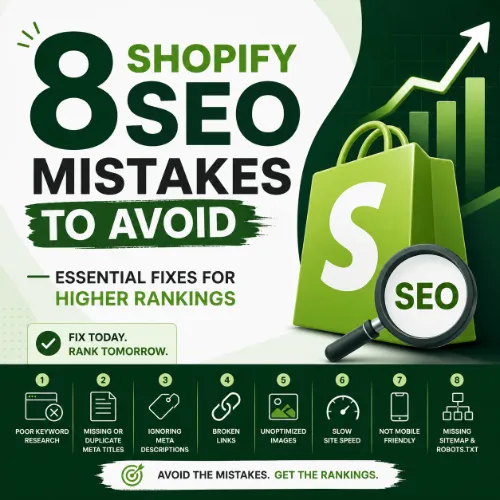
Shopify SEO mistakes Key Takeaways
Running a Shopify store is exciting, but even a beautiful site can fail if it is invisible on Google.
- Eight Shopify SEO mistakes that block ranking success, from duplicate content to slow page speed
- Actionable solutions for each mistake, including technical tweaks, content fixes, and strategic improvements
- Expert tips on using tools, structured data, and internal linking to stay ahead of competitors
Why Shopify SEO Mistakes Hurt Your Store’s Growth
When you open a Shopify store, you expect customers to find you. But search engines follow a strict set of rules. If your site breaks those rules, your products stay hidden. Shopify SEO mistakes like missing meta descriptions, unoptimized images, or broken redirects tell Google your site is less trustworthy. The result is lower rankings, fewer visitors, and lost revenue. For a related guide, see 7 AI SEO Predictions for the Next 5 Years: Expert Forecasts to Avoid Costly Mistakes.
Fortunately, Shopify provides a strong technical foundation. Most errors are easy to fix once you know where to look. By understanding the common Shopify SEO errors and applying the corrections below, you can transform your store from invisible to high-ranking.
The 8 Shopify SEO Mistakes You Must Fix Now
Below are the eight most frequent and costly Shopify SEO mistakes, each explained with a clear description, the harm it causes, and a step-by-step fix.
1. Ignoring Duplicate Content from Product Variants
What it is: When you create product variants (size, color, material), Shopify sometimes generates separate URLs for each option. For example, yourstore.com/blue-shirt and yourstore.com/blue-shirt?variant=123 may show nearly identical content.
Why it hurts: Google sees multiple pages with the same product information. This dilutes your link equity and can trigger a duplicate content penalty, lowering your rankings for all variants.
How to fix it: Set the canonical tag on variant URLs to point to the main product page. In Shopify, this is often handled by your theme, but verify using the Shopify Online Store 2.0 theme settings or a SEO app. Also, disable “Add to cart” links from generating separate indexed URLs.
2. Using Auto-Generated Title Tags and Meta Descriptions
What it is: Shopify fills in title tags and meta descriptions automatically based on the product name and description. Many store owners never customize these fields.
Why it hurts: Auto-generated tags are often too long, miss target keywords, and fail to create a compelling reason for users to click. Without unique meta data, your click-through rate stays low.
How to fix it: Write custom title tags (50–60 characters) and meta descriptions (150–160 characters) for each product, collection, and page. Include your focus keyword naturally and add a call to action, such as “Shop now” or “Free shipping.” Use the SEO fields in the Shopify page editor.
3. Neglecting Image Alt Text and File Names
What it is: Uploading product images with names like IMG_4521.jpg and leaving the alt text blank.
Why it hurts: Search engines rely on alt text to understand images. Without it, you miss out on image search traffic and accessibility signals. Poor file names also waste an opportunity to include relevant keywords.
How to fix it: Rename every image file before uploading using descriptive, keyword-rich names, for example blue-cotton-t-shirt-men.jpg. In the Shopify admin, add concise alt text that describes the image and includes your primary keyword where natural.
4. Slow Page Speed Due to Unoptimized Content
What it is: Large image files, too many apps, and heavy JavaScript slow down your store’s load time.
Why it hurts: Google uses Core Web Vitals as a ranking factor. A slow site frustrates visitors, increases bounce rate, and harms conversions. Shopify stores are often slower than custom builds because of third-party app bloat.
How to fix it: Compress images using tools like TinyPNG or a Shopify image optimizer app. Remove unused apps, minify CSS and JavaScript, and enable lazy loading for images. Use Google PageSpeed Insights to identify specific issues.
5. Having Weak or No Internal Linking Structure
What it is: Not linking between related products, blog posts, or collection pages. Each page exists in isolation.
Why it hurts: Internal links distribute link equity, help users navigate, and allow search engines to discover deep pages. Without them, important pages may never get indexed or ranked.
How to fix it: Add “Related Products” sections on product pages. Link from blog posts to relevant collection or product pages. Use breadcrumb navigation and include contextual links within your content. Aim for 3–5 internal links per page where natural.
6. Missing or Incorrect Structured Data (Schema Markup)
What it is: Not adding structured data for products, reviews, or breadcrumbs, or implementing it with errors.
Why it hurts: Without schema, your store misses out on rich results like star ratings, price ranges, and product availability in search snippets. These rich results dramatically improve click-through rates.
How to fix it: Use Shopify’s built-in JSON-LD schema (many themes include basic product schema) or install a schema markup app like Schema Plus. Validate your schema with Google’s Rich Results Test. Ensure Product schema includes name, image, price, currency, and availability.
7. Poor URL Structure with Unnecessary Parameters
What it is: URLs that include long query strings such as ?variant=123 and sort=newest or /collections/all/products?page=2.
Why it hurts: Messy URLs are harder for search engines to crawl and for users to remember. They also dilute keyword relevance and can cause duplicate content issues. For a related guide, see 11 AI SEO Experiments: Smart Ways to Boost Your Rankings.
How to fix it: Keep URLs short, descriptive, and static. For blog posts and collections, use clean slugs (e.g., /collections/winter-coats). Avoid using pagination URLs as canonical; instead, use rel=”next” and rel=”prev” tags, or self-referencing canonicals.
8. Not Conducting a Regular Site Audit
What it is: Assuming your store is fine because it looks good, and never checking for technical errors like 404 pages, broken redirects, or crawl issues.
Why it hurts: Over time, broken links multiply, orphan pages appear, and indexation problems grow. These common Shopify SEO errors silently drag down your overall site health.
How to fix it: Run a site audit every month using tools like Ahrefs or Semrush. Check for 4xx errors, redirect chains, missing meta tags, and slow pages. Export the report and fix issues by priority. Many SEO apps connect directly to Shopify and simplify this process.
How to Prevent Shopify SEO Mistakes with a Strong Foundation
Fixing errors is important, but preventing them saves time and money. Build a solid SEO foundation from day one: choose a clean, lightweight theme, plan your URL structure, and write unique content for every page. Use a checklist before launching any new collection or product to ensure you are not repeating the 8 Shopify SEO mistakes to avoid. For a related guide, see 15 AI Content Tools Compared: Expert Picks and Mistakes to Avoid.
Regular maintenance is key. Set a monthly reminder to review analytics, check for broken links, and update old content. When you stay proactive, your store stays competitive.
SEO Entities and Their Functions
Understanding key SEO entities helps you make better decisions for your Shopify store. Here is a concise guide to the most relevant ones:
- Website / Domain entities: Analyze whether performance belongs to your entire domain or a specific section (e.g., blog subdirectory). For Shopify, focus on root domain health.
- Keyword entities: Use keyword difficulty (KD) and search volume to pick terms you can realistically rank for. Target long-tail keywords with lower competition.
- Backlink entities: Monitor referring domains, anchor text distribution, and dofollow/nofollow ratios. High-quality backlinks from relevant sites boost your authority.
- Page entities: Track top pages by traffic and by links. These reveal what content resonates. Fix broken pages immediately.
- Content entities: Evaluate article topics, publishing dates, and social shares. Fresh, well-researched content attracts more backlinks.
- SERP entities: Look for featured snippets and People Also Ask opportunities. Structure your content to answer direct questions.
- Technical SEO entities: Audit Core Web Vitals, crawl errors, and duplicate content. Use Google Search Console to find indexation issues.
- Competitor entities: Identify content gaps by analyzing competing Shopify stores. Build better resources on topics they cover poorly.
- Metrics entities: Track Domain Rating (DR), organic traffic, and traffic value. These summarize your overall SEO strength.
Useful Resources
Explore these authoritative sources to deepen your understanding of Shopify SEO mistakes and how to avoid them:
- Shopify’s Official SEO Guide — Comprehensive documentation on optimizing your store from the platform itself.
- Ahrefs: Shopify SEO Checklist — A practical, data-driven guide covering technical and content optimization steps.
Avoiding these Shopify SEO mistakes is the single most effective way to grow your store’s organic traffic. Start by auditing your most important pages, apply the fixes one by one, and monitor your search console for improvements. Your store has the potential to rank high — give it the SEO care it deserves.
Frequently Asked Questions About Shopify SEO mistakes
What are the most common Shopify SEO mistakes ?
Common Shopify SEO mistakes include duplicate content from product variants, auto-generated title tags, missing image alt text, slow page speed, poor internal linking, lack of structured data, messy URL parameters, and skipping regular site audits.
How do I fix duplicate content on my Shopify store?
Set canonical tags to point variant URLs back to the main product page. Avoid creating separate pages for each variant. Use Shopify’s built-in canonical support or an SEO app to manage this.
Does image optimization matter for Shopify SEO?
Yes, image optimization is critical. Use descriptive file names, fill in alt text with relevant keywords, and compress images to improve page load speed and accessibility.
Can I use an SEO app to fix these mistakes?
Absolutely. SEO apps like Plug in SEO, SEO King, or Schema Plus can automate many fixes, such as generating meta tags, adding structured data, and auditing for errors.
How often should I run a site audit for my Shopify store?
Run a full site audit at least once a month. After major updates, add new products, or change themes, audit immediately to catch any new issues.
What is the ideal page load speed for a Shopify store?
Aim for under 2.5 seconds on mobile and under 1.5 seconds on desktop. Use Google PageSpeed Insights to measure and improve Core Web Vitals.
Should I hide product variants from search engines?
Yes, you should generally keep variant URLs out of the index. Set them to “noindex” or use canonical tags pointing to the main product page to avoid duplicate content.
How do I write a good meta description for products?
Keep it under 160 characters, include your primary keyword, describe the product’s unique benefit, and add a call to action such as “Buy now with free shipping.”
What is structured data, and why does it matter?
Structured data is a code format (JSON-LD) that helps search engines understand your content. For Shopify, product schema can show price, availability, and reviews directly in search results.
Can slow apps affect my Shopify SEO?
Yes. Each app adds JavaScript and CSS that can slow down your site. Only keep essential apps and regularly review their performance impact.
How do I create a clean URL structure?
Use short, descriptive slugs without special characters or parameters. For collections, use /collections/category-name. Avoid including numbers or session IDs.
Do I need a blog for Shopify SEO?
A blog helps you target informational keywords, build topical authority, and earn backlinks. It is a powerful addition to any SEO strategy.
What is the biggest mistake new Shopify store owners make?
The biggest mistake is launching without a proper SEO foundation — no custom meta tags, no keyword research, and unoptimized images. This sets the store back from day one.
How do I find broken links on my Shopify site?
Use tools like Ahrefs, Screaming Frog, or Google Search Console’s Coverage report to identify 404 errors and broken links. Fix them by redirecting to relevant pages.
Is it okay to use stock photos without alt text?
No. Always add descriptive alt text, even for stock photos. This helps with accessibility and gives search engines context for image indexing.
What is a redirect chain, and why is it bad?
A redirect chain is a series of multiple redirects (e.g., Page A → Page B → Page C). It slows down page load and passes less link equity. Always redirect directly to the final URL.
Can I use the same meta description for every product?
No. Duplicate meta descriptions across many pages can cause Google to ignore them. Write unique meta descriptions for each product, collection, and page.
How do I check if my schema markup is working?
Use Google’s Rich Results Test or Schema Markup Validator. Enter your product URL, and it will show any errors or warnings.
What is crawl budget, and does it affect Shopify stores?
Crawl budget is the number of pages Google will crawl on your site within a given time. For large Shopify stores with thousands of products, fixing duplicate and thin content helps Google crawl more important pages.
Should I use Ahrefs or Semrush for Shopify SEO audits?
Both tools are excellent. Ahrefs is strong for backlink analysis and keyword research. Semrush offers a comprehensive site audit tool and competitive analysis. Choose based on your budget and preference.