
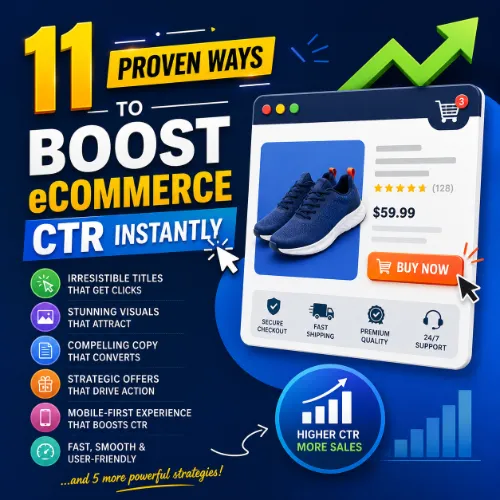
improve eCommerce CTR Key Takeaways
Click-through rate (CTR) directly impacts how much traffic your product pages and category listings receive from search engines and ad campaigns.
- Optimizing title tags and meta descriptions is the fastest way to improve eCommerce CTR from organic search.
- Adding structured data (schema markup) helps your listings earn rich results that stand out in SERPs.
- Testing different call-to-action phrasing and button colors can lift CTR by 10–30% on product pages.
Why CTR Is Critical for eCommerce Growth
Every click that lands on your store is a potential customer. If your pages appear on search results but rarely get clicked, you are leaving money on the table. improve eCommerce CTR means more traffic from the same rankings, lower cost per click in paid campaigns, and higher return on every content piece you publish. Understanding how to improve eCommerce click-through rate separates high-performing stores from average ones. For a related guide, see 10 AI SEO Hacks That Actually Work (Proven Results).
What Affects eCommerce CTR Most
Several signals determine whether a user clicks your listing or your competitor’s: relevance of the snippet, emotional trigger in the headline, presence of reviews or ratings, and visual elements like images or price tags. Each of the 11 strategies below targets one or more of these signals.
1. Write Compelling Title Tags That Include the Target Keyword
Your title tag is often the first thing a searcher reads. Include your primary keyword near the front, but also add a benefit or urgency. For example, instead of “Blue Running Shoes,” use “Buy Lightweight Blue Running Shoes – Free Shipping.” This simple change can improve eCommerce CTR by 10–20% in many niches.
Title Tag Best Practices
- Keep under 60 characters to avoid truncation.
- Add a unique selling point (free shipping, sale, limited edition).
- Avoid keyword stuffing — one or two natural mentions are enough.
2. Optimize Meta Descriptions With a Clear Value Proposition
Although not a direct ranking factor, the meta description heavily influences CTR. Write descriptions that answer the searcher’s intent and include a call-to-action like “Shop now” or “Get yours today.” Including your focus keyword naturally in the description can improve eCommerce click-through rate because it signals relevance to both users and search engines.
3. Use Structured Data to Earn Rich Snippets
Rich snippets — like star ratings, price, availability, and review counts — dramatically increase visibility. When you implement product schema, your listings can display those extra details directly in search results. Pages with rich snippets often see a 20–30% higher CTR. Use tools like Google’s Merchant Center or Schema.org markup to enable these enhancements.
4. Add High-Quality Product Images and Videos
In image search and shopping ads, visuals are everything. Ensure your product photos are high-resolution, show multiple angles, and include zoom functionality. Video demonstrations or unboxing clips also boost engagement. When users see clear, appealing visuals, they are far more likely to click through to your store.
5. Write Benefit-Driven Product Descriptions
Move beyond listing features. Explain how each feature solves a problem or improves the customer’s life. Instead of “Cotton fabric,” say “Breathable cotton keeps you cool during summer runs.” This approach connects emotionally and motivates clicks. Every product page should be treated as a landing page designed to improve eCommerce CTR and conversions.
6. Leverage Social Proof and User-Generated Content
Displaying real customer reviews, testimonials, and “As seen on” badges builds trust. Adding a snippet like “Rated 4.8 out of 5 by 2,000+ shoppers” near your call-to-action can lift CTR by reducing purchase anxiety. Social proof signals that others have bought and loved the product, making new visitors more likely to click.
7. Create Urgency With Countdown Timers and Limited Stock Alerts
Urgency taps into the fear of missing out. Show countdown timers for flash sales, “Only 3 left in stock” messages, or “Sale ends in 2 hours” banners. These visual cues push hesitant visitors to click and buy now rather than wait. Use them sparingly to maintain credibility.
8. A/B Test Call-to-Action Buttons and Placements
Your button copy, color, size, and location all affect CTR. Test variations like “Add to Cart” vs. “Buy Now” or “Get Yours” vs. “Shop the Deal.” Move the primary button above the fold and repeat it further down the page. A 2024 study by HubSpot found that changing a CTA from green to red increased clicks by 21% for one eCommerce brand.
9. Optimize for Mobile Users First
More than half of eCommerce traffic comes from mobile devices. Ensure your site loads quickly, buttons are large enough to tap, and text is readable without zooming. Poor mobile experience leads to high bounce rates and low CTR. Use Google’s Mobile-Friendly Test tool to identify issues and fix them.
10. Personalize Product Recommendations and Emails
Segment your audience and show products based on browsing history, past purchases, or abandoned carts. Personalized emails have open rates 29% higher than generic ones, and on-site recommendations can boost CTR by 15%. Even simple tactics like “Customers who bought this also bought…” increase relevance and clicks.
11. Monitor Performance and Iterate Using Analytics
Track your CTR from organic search, paid ads, email campaigns, and social media using tools like Google Search Console, Google Analytics, and Ahrefs. Identify which pages have low CTR and test one change at a time. Continuous monitoring ensures that your efforts to improve eCommerce CTR result in measurable gains.
Tracking CTR Optimization Tips
- Set up custom reports in Google Analytics to see page-level CTR.
- Check Search Console for queries with high impressions but low CTR — those are your quick wins.
- Compare week-over-week and month-over-month trends to spot improvements.
Useful Resources
For more data on improving CTR, check out Ahrefs’ guide to click-through rate and Google’s official product schema documentation.
Frequently Asked Questions About improve eCommerce CTR
What is a good CTR for eCommerce sites?
The average organic CTR for eCommerce product pages ranges from 2% to 5%, but top performers can achieve 10% or higher depending on the niche and ranking position.
How can I improve my eCommerce CTR quickly?
Focus on title tag optimization, meta description improvement, and adding structured data. These three changes can produce results within days.
Does CTR affect SEO ranking?
CTR is not a direct ranking factor, but high CTR signals relevance to search engines, which can indirectly influence rankings over time. For a related guide, see 11 AI SEO Experiments: Smart Ways to Boost Your Rankings.
What is the difference between CTR and conversion rate?
CTR measures the percentage of people who click your link out of those who see it. Conversion rate measures the percentage of those visitors who complete a desired action, like a purchase.
How does mobile optimization improve CTR?
A fast, easy-to-navigate mobile experience keeps users engaged and reduces bounce rates, making them more likely to click through to your product pages.
Should I use emojis in title tags?
Emojis can increase CTR in some niches (like food or fashion) by adding visual interest, but they may appear unprofessional in others. Test carefully.
What is a rich snippet?
A rich snippet is an enhanced search result that displays extra information such as star ratings, price, availability, or recipe times, often resulting in higher CTR.
How many keywords should I target per page?
Focus on one primary keyword and two or three related LSI keywords per page to maintain clarity and avoid keyword stuffing.
Can social proof really increase CTR?
Yes. Showing customer reviews, ratings, or trust badges builds credibility and reassures visitors, leading to higher click-through rates on product pages.
What tools help track eCommerce CTR ?
Google Search Console, Google Analytics, Ahrefs, SEMrush, and Hotjar are top tools for monitoring CTR and user behavior.
How does load speed affect CTR?
Page speed is a known ranking factor, and slow-loading pages increase bounce rates, lowering the likelihood that users will click through to your site from search results.
Is it worth optimizing for voice search CTR?
Voice search often returns featured snippets or position zero results. Optimizing for these can capture voice traffic and improve overall CTR.
Should I use brand names in my title tags?
Including your brand name can build trust, especially if it is well-known. For smaller brands, test with and without to see which generates higher CTR.
What is a good meta description length?
Keep meta descriptions between 150 and 160 characters to ensure they display fully in search results without being cut off.
How often should I A/B test my CTAs?
Run A/B tests continuously on your top traffic pages. Even small changes should be tested for at least two weeks to gather statistically significant data.
Can videos in product pages improve CTR?
Yes. Product videos increase engagement and time on page, which signals quality to search engines and encourages users to explore more products.
What is the role of internal links in CTR?
Internal links guide users to relevant products or categories, keeping them on your site longer and increasing the chance of additional clicks.
Do longer product descriptions hurt CTR?
Not necessarily. Long descriptions can improve SEO and provide detailed information, but make sure the most important details and benefits appear above the fold.
How do I know which SERP features to target?
Analyze your keyword’s current SERP layout. If many results show featured snippets or local packs, optimize for those specific features to capture more clicks. For a related guide, see 10 SERP Features Stealing Your Clicks: Avoid These Click Loss Traps.
What is the biggest mistake eCommerce sites make with CTR?
Ignoring mobile usability and having slow page loads are the top mistakes. Even the best titles and descriptions won’t save a poor mobile experience.